
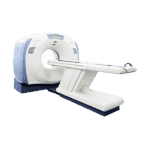
The GE Optima 540 16 Slice CT Scanner offers a streamlined workflow to provide the most reliable and consistent imaging results
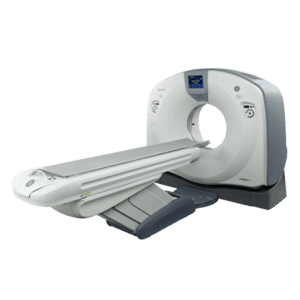
GE Optima 540 Overview
The GE Optima 540 16 Slice CT Scanner optimizes the patient experience while continuing to provide exquisite image quality. It answers your need for exceptional clinical results with an increased volume of patient throughput and a focus on patient-centered tasks.
Benefits:
- HiLight Matrix Detector with 24 reference elements and 0.5-sec rotation speed.
- ASiR1 to help you achieve your lower dose needs.
- Volara Digital DAS with an increased sampling rate of up to 20% and electronic noise reduction up to 33%.
- Speed with IQE—70 cm chest-abdomen-pelvis in 10 seconds. Boost your pitch and cover more anatomy at the same image quality.
- The short geometry design of the Optima CT540 system enables equivalent imaging flux compared to a system with a longer geometry and higher generator power.
- Ultra compact form – maintains the optimal speed, power and resolution needed for all kinds of CT applications. Yet it fits in the same space as a single slice for an easier installation.
- Freedom Workspace offers sit/stand and horizontal/vertical monitor flexibility. It can also help reduce noise and heat with remote location of the console.
Features:
- Xtream Display with on-gantry display for patient name recognition and exam type.
- Default Patient Positioning provides easy and simple positioning.
- Dynamic Transition SmartPrep allows intermittent monitoring of IV contrast enhancement in an area of interest.
- Emergency Patient Mode has a dedicated User Interface (UIF) for emergency cases to start examinations quickly.
- Prospective Multiple Reconstruction (PMR) allows up to 10 sets of reconstructions to be pre-programmed as part of the scan protocol prior to acquisition.
- Enhanced filming workflow tool provides a friendly and powerful user interface. Allows you to open multiple sessions at the same time for one or more patients and to set up multiple films in parallel.
More Options
Related CT Scanners
Buying a Used Optima CT540: What to Check Before You Commit
Everything above describes the CT540 platform. None of it describes the particular scanner in your quote. On a used system the distance between those two things comes down to three items: the tube, the licenses, and the paperwork.
Why you will see both 16 and 32 on this platform
This page lists the system as 16 slice. GE’s datasheet for its refurbished GoldSeal Optima 540 with ASiR lists that configuration’s image chain as 16 channel, 32 slice per rotation, on a HiLight matrix II detector, with a 0.5 second rotation and 0.625 mm thin slice images.
Those figures describe GE’s refurbished configuration, not the scanner in your quote. GE states both numbers without saying how the 32 slice figure is produced, so treat the reconstruction method as something to confirm rather than assume. Ask for the configuration report on the scanner being offered, then compare the detector hardware and the installed software release against it instead of trusting the headline number in a listing title. If you are still shortlisting, the full range of refurbished and used 16 slice CT scanners is a better starting point than one listing.
Review the exact tube history
GE’s refurbished datasheet lists a Performix 6.3 MHu x-ray tube and a 53.2 kW generator for this configuration. The offered scanner still needs its own tube record.
Ask for the tube’s part number, install date, current exposure count, service history, and any applicable warranty terms. Obtain a current replacement estimate when the tube record creates a budget concern.
Treat every named option as something to confirm
GE’s datasheet for the refurbished configuration lists ASiR, Dose Check, IQ Enhance, Volume Viewer On Console, and SmartMar among its image analysis items, lists ConnectPro as a software key, and marks others, including the Xtream Integrated Injector and Exam Split, as optional. A feature named on a platform page is not automatically a feature installed and licensed on the scanner you are buying.
Get the installed software version and the list of active licenses in writing, and ask in the same message which of those licenses transfer to you and on what terms. Then confirm during acceptance testing that each one actually runs on the console in front of you.
Site fit is measured, not assumed
The same GE datasheet lists a 70 cm aperture, a 1730 mm scannable range, and a 500 lb (227 kg) table weight limit. The Benefits list above says the system fits the same space as a single slice scanner. Read that as a statement about the platform’s footprint, not as a measurement of your room.
Before you sign, compare the exact equipment drawings with the room, delivery route, electrical service, cooling capacity, and shielding design. For comparison against other systems in the same class, see used CT machines for sale.
Ask for this on the exact scanner
- Gantry, console, and table serial numbers
- Tube part number, install date, and exposure count
- Software version and the full list of active licenses, with the transfer terms for each
- The last service report and the most recent quality control results, with dates
Questions buyers ask
Does every Optima CT540 come with ASiR?
No. GE sells the refurbished configuration under the name “Optima 540 with ASiR,” which tells you the option exists for this platform. It does not tell you it is installed and licensed on a given scanner. Ask for the license list, and watch ASiR run during acceptance testing before you accept delivery.
What should I ask about the previous installation?
Why the system is coming out, whether it was scanning on the day it was deinstalled, who performed the deinstallation, and whether that work was documented with photos and a component and cable inventory. A scanner pulled while in clinical service with a clean record is a different purchase from one that has been sitting in a warehouse.
Ask for a configuration report
The Request Pricing button on this page opens Amber’s general contact form and does not carry the model across with it, so name the GE Optima CT540 in your message. Ask for the serial numbers, the tube history, the license list, and the most recent quality control results for the scanner currently being offered. Ask for availability to be confirmed separately. You can also contact Amber directly if you would rather talk through the site requirements first.
