
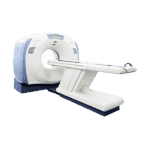
The GE LightSpeed PRO 32 Slice CT Scanner is capable of scan speeds as fast as 0.4 second full 360-degree rotation scans
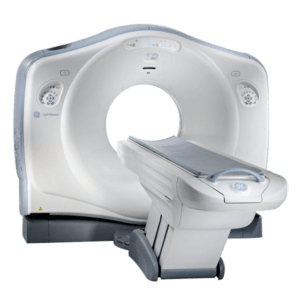
GE LightSpeed PRO Overview
The GE LightSpeed PRO 32 Slice CT Scanner is a whole body, multi-slice helical CT machine capable of scan speeds as fast as .4 second full 360-degree rotation scans, while acquiring multiple slice in a single scan rotation. The system is designed to produce optimum image quality with fully simultaneous scan, image reconstruction, filming, archiving, networking, and display. This scanner was made possible by design for Six Sigma methodology.
Benefits:
Patient Positioning Table
• 51cm (21 in.) Minimum Elevation
• GT-2000 Long Table, 175 mm/sec travel time.
• 500 lb. Capacity to Performance Specification
High Voltage Generator/ Power Distribution Unit
• 100 kW Generator
• kVp Selections – 80, 120 and 140 kVp
• mA Selections â 10 to 800 mA (5 mA steps)
Features:
- GE LightSpeed CT Scanner 32 Slice
- MX-240 Performix Pro Tube
- 100kW Hi-Frequency Generator
- H2 Operators Console
- 2-20″ Color Monitors
- Dicom Compatible
- Hilight Ceramic Detector
- Patient Table
- 0.4 – 4 Second 360 degree Rotation Speed
More Options
Related CT Scanners
Evaluating a Used LightSpeed PRO: Beyond the Slice Count
The specifications above describe the LightSpeed PRO platform. They do not describe the scanner you would receive. On a legacy CT, the gap between those two things is where projects go wrong.
Slice count is the label buyers shop by, and it is the least informative number on the page. “32-slice” can be reached through different detector and acquisition configurations, and two systems carrying the same label can differ in detector rows, reconstruction options, installed software and licensed clinical packages. Buyers weighing this system against a GE BrightSpeed Elite 16 Slice CT scanner or against other 32-slice CT systems should ask how the figure is derived for each exact system, then work down the list below.
Record the system identity
Get serial numbers for the gantry, console, generator, tube and table, plus the exact detector configuration. Note the software release at the same time. On a platform of this generation, the release level often decides whether an option is installed, available as an upgrade, or no longer supported at all.
Treat tube history as the main financial question
The tube is the single largest variable in the cost of owning a legacy CT. Ask for:
- Tube identity and whether it is original or a replacement
- Usage history, including scan seconds or exposure counts if the logs retain them
- Replacement dates and what was replaced alongside it
- Preventive-maintenance records and their intervals
- Error logs from the last period of clinical operation
- Current inspection results with dates
A scanner priced attractively with an aging tube is not priced attractively. Get the history before the number.
Verify installed capability
Confirm the software release, reconstruction and dose-management licenses, clinical packages, DICOM functions and included accessories. Ask specifically which licenses transfer with the sale. Keyed options tied to a previous owner’s installation are a recurring surprise on secondary-market CT.
Match the scanner to the site
A CT project is a building project with a scanner in it. Confirm the delivery path and every door, turn and elevator along it. Then have qualified professionals review floor loading, electrical supply, cooling capacity, shielding design, networking and acceptance-testing requirements against this exact scanner. Shielding and structural determinations belong to a qualified physicist and a structural engineer working from the manufacturer’s planning data for the configuration you are buying.
Pin the scope down in writing
CT quotes vary more in what they exclude than in what they include. Make each one answer the same questions:
- Is the tube covered, and under what terms? Name the remaining warranty or service position on the tube specifically, separate from the system.
- Which software licenses and clinical packages transfer, and which are keyed to the seller’s installation?
- Does the figure include deinstallation, rigging, transport, installation, calibration and applications training, or equipment only?
- Who produces the acceptance and quality-control records, and who signs off on radiation safety and state registration?
- Which structural, electrical and cooling data does the buyer have to approve before the scanner is released for shipment?
Agree on acceptance before shipment
Decide in advance which tests have to pass before you release the scanner for clinical use, and who runs each one. Split them into two lists. One covers what can be demonstrated on a powered system before it ships. The other covers what only exists after installation: image quality on your protocols, dose measurements, worklist and PACS routing, and physics acceptance.
If the scanner is already deinstalled, the first list may be nearly empty, and you need to price that risk rather than assume it away. A clean gantry proves nothing about imaging performance, connectivity or serviceability.
Does “32-slice” tell you what the scanner can do?
No. Request the detector and acquisition configuration, the tube and generator identities, the software licenses, the table specification and the DICOM conformance statement for the exact system. Systems sharing a family label can represent different revisions and different installed options.
Ask for a scanner-specific review
State which protocols you plan to run, where the scanner is going, when you need it live, and whether you want the project handled as equipment only or as a full deinstall-to-acceptance scope. Ask for availability and sourcing to be confirmed separately, in writing, along with every component and service in the quote. Send those details through Amber’s quote request form, and name this scanner in the message.
